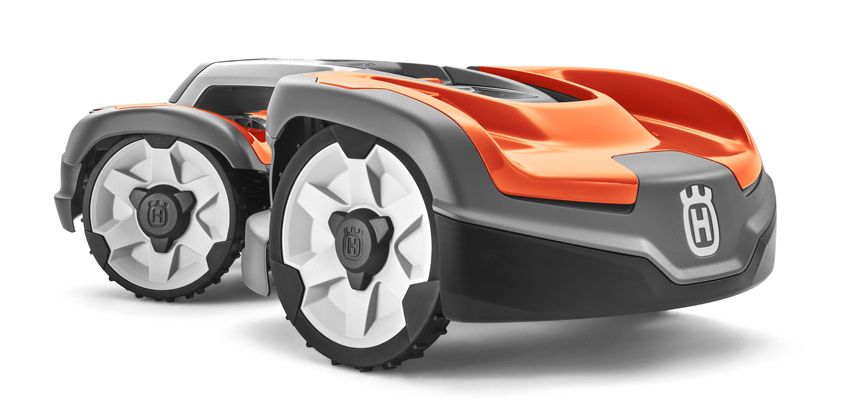
KUR ZANLEITUNG GUIDE R APIDE GUIDA R APIDA QUICK GUIDE - HUSQVARNA AUTOMOWER 535 AWD
←
→
Transcription du contenu de la page
Si votre navigateur ne rend pas la page correctement, lisez s'il vous plaît le contenu de la page ci-dessous
K U R Z A N LE I T U N G
                                      G U I D E R A PI D E
                                      G U I DA R A PI DA
                                        Q U I CK G U I D E
                                        H U S QVA R N A AU TO M O W E R ®
                                                              535 AW D

P25Pro_QG_1140563_535_AWD.indd 1                                      2019-02-08 14:37:22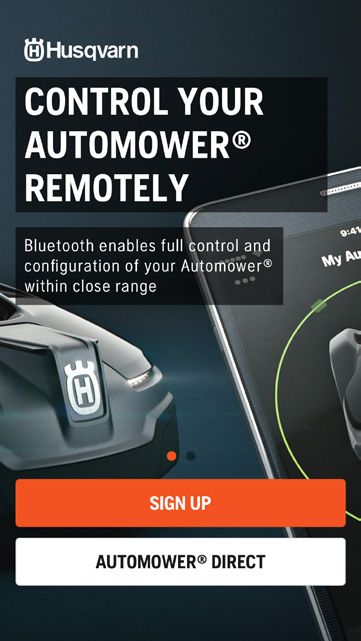
1                                                      3 m / 10 ft

       2
                                                   75 cm / 21/2’

                                                           0 cm / 0”

                                                                              10 cm / 4”

                        10 cm / 4”

                                                                                         35 cm / 14”

                                     30 cm / 12”
                                                                            min 2 m / 7 ft

P25Pro_QG_1140563_535_AWD.indd 2                                                                       2019-02-08 14:37:23
FFür weitere Informationen und Anweisungen, lesen Sie die komplette Bedienungsanleitung auf der
Husqvarna-Website durch (www.husqvarna.com). DE
1. AU FS T E L L E N U N D A N S C H L I E S S E N D E R L A D E S TAT I O N
1. Die Ladestation sollte auf einer relativ horizontalen Fläche zentral im Arbeitsbereich positioniert werden, mit viel
Freifläche vor der Ladestation.
2. Schließen Sie das Niederspannungskabel der Stromversorgung an die Ladestation und das Netzteil an.
3. Schließen Sie das Netzteil an eine Steckdose mit 100 – 240 V an.
4. Stellen Sie das Gerät zum Aufladen des Akkus in die Ladestation, während das Begrenzungskabel verlegt wird. Starten
Sie das Gerät.
2. PL AT Z I E R U N G D E S B EG R E N Z U N G S K A B E L S U N D D E S L E I T K A B E L S
1. Legen Sie Begrenzungskabel so, dass es eine Schleife um den Arbeitsbereich bildet.
2. Machen Sie eine Schleife an der Stelle, an der das Leitkabel später verbunden wird.
3. Das Leitkabel zu dem Punkt an der Begrenzungsschleife verlegen, an dem diese verbunden werden sollen. Vermeiden
Sie eine Kabelverlegung mit spitzen Winkeln.
4. Für einen Mindestabstand zu Hindernissen siehe Abbildung (Nummer 5).
3. A N S C H L I E S S E N D E S B EG R E N Z U N G S K A B E L S U N D D E S L E I T K A B E L S
1. Schmale Passagen im Garten können die Suche des Geräts nach der Ladestation erschweren. Das Gerät kann unter
Verwendung des Suchkabels an entlegene Gartenbereiche geführt werden. Das Suchkabel unterstützt das Gerät beim
schnellen Finden der Ladestation.
2. Das Leitkabel unter der Ladestation verlegen und mindestens zwei Meter aus der Vorderkante der Ladestation
herausziehen.
3. Die Verbinder öffnen und die Kabelenden in die Einbuchtungen der Verbinders legen.
4. Den Verbinder mit einer Zange zusammendrücken.
5. 1-2 cm oberhalb des jeweiligen Verbinders abschneiden.
6. Drücken Sie die Verbinder auf die Kontaktstifte an der Ladestation, jeweils markiert als AL (links) und AR (rechts). Es ist
wichtig, dass das rechte Kabel an den rechten Kontaktstift und das linke Kabel an den linken Kontaktstift angeschlossen
wird.
7. Den Verbinder auf den mit ”G1” gekennzeichneten Kontaktstift an der Ladestation setzen. Zusätzliche Führungen ähnlich.
4. A N S C H L I E S S E N D E S L E I T K A B E L S A N DA S B EG R E N Z U N G S K A B E L S
1. Das Begrenzungskabel mit einer Kneifzange in der Mitte der in Punkt 2.2 erstellten Schleife abschneiden.
2. Das Leitkabel mit dem Begrenzungskabel mithilfe des zugehörigen Verbinders verbinden. Die Verbinder mit einer Zange
vollständig zusammendrücken.
S TA R T E N U N D S TO PPE N
STARTEN
1. Drücken Sie die START-Taste.
2. Drücken Sie die EIN-/AUS-Taste für 3 Sekunden.
3. Melden Sie sich bei der Automower® Connect App an, und folgen Sie den Anweisungen.
STOPPEN
STOP-Taste drücken.
E I N S T E L L E N D E S G E R ÄT S AU F D I E G RÖ S S E I H R E R R A S E N FL ÄC H E
Stellen Sie die Mähzeit für Ihren Garten mit der Timer-Funktion ein. Das Gerät schneidet ca. 146 m² (0,036 Acre) pro Stunde
am Tag. Wenn Ihre Gartenfläche beispielsweise über 1200 m² Grasfläche verfügt, benötigt das Gerät 8 Stunden am Tag.
WA R T U N G
1. Das Gerät muss ausgeschaltet werden, bevor eine Wartung durchgeführt wird (z. B. Reinigen oder Klingen
auswechseln). Wenn die LED-Anzeigelampe auf der EIN-/AUS-Taste nicht leuchtet, ist das Gerät deaktiviert. Tauschen
Sie die Messer für ein stets optimales Mähergebnis regelmäßig aus.
2. Den Mähroboter nie mit einem Hochdruckreiniger oder unter fließendem Wasser reinigen. Keine Lösungsmittel zum
Reinigen benutzen.
3. Alle Verbindungen zur Ladestation (Stromversorgung, Begrenzungs- und Leitkabel) müssen getrennt werden, falls ein
Gewitterrisiko besteht.
4. Laden Se die Batterie am Ende der Saison vor der Wintereinlagerung vollständig auf.
P25Pro_QG_1140563_535_AWD.indd 3 2019-02-08 14:37:24Pour plus d’informations et d’instructions, lisez l’intégralité du manuel de l’opérateur sur le site Web de
Husqvarna (www.husqvarna.com/fr/). FR
1. I N S TA L L AT I O N E T B R A N C H E M E N T D E L A S TAT I O N D E C H A RG E
1. Placez la station de charge à un endroit central de la zone de tonte, avec un grand espace ouvert face à elle, et sur une
surface relativement horizontale.surface relativement horizontale.
2. Branchez le câble d’alimentation basse tension à la station de charge et à l’alimentation.
3. Branchez l’alimentation électrique sur une prise murale de 100-240 V.
4. Placez le produit dans la station de charge pour charger la batterie pendant la pose du câble périphérique. Faites
démarrer le produit.
2. P O S E D U CÂ B L E PÉ R I PH É R I Q U E E T D U CÂ B L E G U I D E
1. Disposez le câble périphérique afi n qu’il forme une boucle autour de la zone de travail.
2. Faites un oeillet au point où le câble guide sera connecté ultérieurement.
3. Faites courir le câble guide jusqu’au point du câble périphérique où se fera la connexion. Évitez de poser le câble dans
des angles serrés.des angles serrés.
4. Pour connaître la distance minimum avec les obstacles et les îlots, reportez-vous à l’illustration (numéro 5).
3. C O N N E X I O N D U CÂ B L E PÉ R I PH É R I Q U E E T D U CÂ B L E G U I D E
1. Les passages étroits de votre pelouse compliquent la tâche du produit pour trouver la station de charge. Le produit peut
être dirigé vers des zones éloignées du jardin à l’aide du câble guide. Le câble guide permet aussi au produit de trouver
rapidement la station de charge.
2. Disposez le câble guide sous la station de charge et à au moins 2 mètres de la partie frontale de la station de charge.
3. Ouvrez les connecteurs et placez les extrémités du câble dans les rainures de chaque connecteur.
4. Serrez les connecteurs à l’aide d’une pince.
5. Coupez 1 à 2 cm au-dessus des connecteurs.
6. Enfoncez les connecteurs dans les broches de contact, indiquées par AL (gauche) et AR (droite) sur la station de charge.
Il est important que le câble de droite soit connecté à la broche de droite et le câble de gauche, à la broche de gauche.
7. Branchez le connecteur à la broche de contact indiquée par G1 sur la station de charge. Guides supplémentaires de la
même manière.
4. C O N N E X I O N D U CÂ B L E G U I D E AU CÂ B L E PÉ R I PH É R I Q U E
1. Coupez le câble périphérique à l’aide d’une pince coupante au centre de l’oeillet que vous avez fait à l’étape 2.2.
2. Branchez le câble guide au câble périphérique à l’aide des coupleurs fournis. Pressez complètement les coupleurs à
l’aide d’une pince.l’aide d’une pince.
D É M A R R AG E E T A R R Ê T
DÉMARRAGE
1. Appuyez sur le bouton DÉMARRAGE.
2. Appuyez sur le bouton On/Off pendant 3 secondes.
3. Connectez-vous à l’application Automower ® Connect et suivez les instructions.
ARRÊT
Appuyez sur le bouton STOP.
R ÉG L AG E D U PRO D U I T E N FO N C T I O N D E L A TA I L L E D E VOT R E PE LO U S E
Ajustez le temps de tonte en fonction de votre jardin à l’aide de la fonction Minuterie. Le produit coupe environ 146 m² / 0,036
acre par heure et par jour. Par exemple, si votre jardin comprend 1 200 m² de pelouse, le produit devra fonctionner 8 heures
par jour.
MAINTENANCE
1. Le produit doit être arrêté avant toute opération de maintenance, telles que le nettoyage ou le remplacement des lames. Le
produit est désactivé lorsque l’indicateur LED de le bouton On/Off est éteint. Remplacez les lames régulièrement pour
obtenir des résultats de tonte optimaux.
2. Ne nettoyez jamais le robot de tonte avec un nettoyeur à haute pression ni à l’eau courante. N’utilisez jamais de
solvants pour le nettoyage.pour le nettoyage.
3. Tous les raccordements de la station de charge (alimentation électrique, câble périphérique et câble guide) doivent être
débranchés en cas de risque d’orage.
4. Chargez complètement la batterie à la fin de la saison avant de ranger le robot pour l’hiver.
P25Pro_QG_1140563_535_AWD.indd 4 2019-02-08 14:37:24Per ulteriori informazioni e istruzioni, consultare il Manuale operatore completo sul sito Web Husqvarna
(www.husqvarna.com). IT
1. P O S I Z I O N A M E N TO E C O L L EG A M E N TO D E L L A S TA Z I O N E D I R I CA R I CA
1. Posizionare la stazione di ricarica in una posizione centrale nell’area di lavoro, su una superficie relativamente
orizzontale e con molto spazio di fronte alla stazione stessa.
2. Collegare il cavo a bassa tensione dell’alimentazione alla stazione di ricarica e all’alimentazione.
3. Collegare il cavo di alimentazione a una presa a muro da 100-240 V.
4. Collocare il prodotto nella stazione di carica per caricare la batteria durante la posa del cavo perimetrale. Avviare il
prodotto.
2. P O S A D E L CAVO PE R I M E T R A L E E D E L CAVO G U I DA
1. Estendere il cavo perimetrale assicurandosi che formi un anello intorno all’area di lavoro.
2. Predisporre un occhiello nel punto in cui il cavo guida verrà collegato più tardi.
3. Condurre il cavo guida fino al punto dell’anello perimetrale dove verrà effettuato il collegamento. Durante la posa del
cavo evitare gli angoli stretti.
4. Per la distanza minima dagli ostacoli e dalle isole, vedere l’illustrazione (numero 5).
3. C O L L EG A M E N TO D E L CAVO PE R I M E T R A L E E D E L CAVO G U I DA
1. I passaggi stretti presenti nel giardino rendono difficile il ritrovamento della stazione di ricarica da parte del prodotto. Il
prodotto può essere spostato in aree periferiche del giardino tramite il cavo guida. Il cavo guida aiuta inoltre il prodotto a
trovare rapidamente la stazione di ricarica.
2. Posare il cavo guida sotto la stazione di ricarica e per almeno 2 metri in linea retta dalla parte frontale della stazione di
ricarica.
3. Aprire il connettore e appoggiare le estremità del cavo negli incavi di ogni connettore.
4. Premere i connettori insieme usando un paio di pinze.
5. Tagliare a 1 o 2 cm sopra i connettori.
6. Premere i connettori sui pin di contatto della stazione di ricarica contrassegnati con AL (sinistra) e AR (destra). È
importante che il cavo di destra sia collegato al pin di contatto di destra e che il cavo di sinistra sia collegato al pin di
sinistra.
7. Fissare il connettore al pin di contatto contrassegnato da G1 presente sulla stazione di carico. Le guide supplementari
funzionano in modo analogo.
4. C O L L EG A M E N TO D E L CAVO G U I DA A L CAVO PE R I M E T R A L E
1. Tagliare il cavo perimetrale con dei tagliafili al centro dell’occhiello predisposto al punto 2.2.
2. Collegare il cavo guida al cavo perimetrale usando i giunti in dotazione. Premere i giunti per unirli completamente con
un paio di pinze.
AV V I A M E N TO E A R R E S TO
AV VIAMENTO
1. Premere il pulsante START.
2. Premere il pulsante On/ Off per 3 secondi.
3. Accedere all’app Automower® Connect e seguire le istruzioni.
ARRESTO
Premere il pulsante STOP.
R EG O L A Z I O N E D E L PRO D OT TO I N B A S E A L L E D I M E N S I O N I D E L PR ATO
Adattare il tempo di taglio al giardino utilizzando la funzione Timer. Il prodotto taglia circa 146 m² all’ora. Per esempio, se il
giardino è di 1200 m², il prodotto deve lavorare 8 ore al giorno.
MANUTENZIONE
1. Il prodotto deve essere spento prima di procedere a interventi di manutenzione come la pulizia o la sostituzione delle
lame. Quando la spia LED sulla il pulsante On/ Off non è accesa, il prodotto è disattivato. Sostituire regolarmente le
lame per ottenere risultati di taglio ottimali.
2. Per la pulizia del rasaerba robotizzato, non utilizzare mai dispositivi di lavaggio ad alta pressione, né acqua corrente.
Non utilizzare mai solventi per la pulizia.
3. Scollegare tutti i collegamenti alla stazione di ricarica (alimentazione, cavo perimetrale e cavo guida) se c’è il rischio di
un temporale.
4. Caricare completamente la batteria alla fine della stagione prima del rimessaggio invernale.
P25Pro_QG_1140563_535_AWD.indd 5 2019-02-08 14:37:24For more information and instructions, read the complete Operator ’s manual on the Husqvarna
website (w w w.husqvarna.com). EN
1. PL AC E M E N T O F A N D CO N N EC T I N G T H E C H A RG I N G S TAT I O N
1. Place the charging station with a lot of open space in front of the charging station and on a relatively horizontal surface.
2. Connect the power supply’s low voltage cable to the charging station and the power supply.
3. Connect the power supply to a 100-240 V wall socket.
4. Place the product in the charging station to charge the battery while the boundary wire is laid. Start the product.
2. PL AC E M E N T O F T H E B O U N DA RY W I R E A N D T H E G U I D E W I R E
1. Lay the boundary wire so that it forms a loop around the work area.
2. Make an eyelet at the point where the guide wire will later be connected.
3. Run the guide wire to the point on the boundary loop where the connection will be made. Avoid laying the wire at tight angles.
4. For minimum distance to obstacles and islands, see illustration (number 5).
3. CO N N EC T I N G T H E B O U N DA RY W I R E A N D T H E G U I D E W I R E
1. Narrow passages in the garden make it difficult for the product to find the charging station. The product can be lead to remote
garden areas using the guide wire. The guide wire also helps the product to quickly find the charging station.
2. Lay the guide wire under the charging station and at least 2 m straight out from the front edge of the charging station.
3. Open the connectors and lay the wire ends in the recesses on each connector.
4. Press the connectors together using a pair of pliers.
5. Cut 1-2 cm above the connectors.
6. Press the boundary connectors onto the contact pins, marked AL (left) and AR (right), on the charging station. It is important
that the right-hand wire is connected to the right-hand contact pin, and the left-hand wire to the left-hand pin.
7. Fasten the guide connector to the contact pin marked G1 on the charging station. Additional guides the similar way.
4. CO N N EC T I N G T H E G U I D E W I R E TO T H E B O U N DA RY W I R E
1. Cut the boundary wire with a wire cutters at the centre of the eyelet that was made in step 2.2.
2. Connect the guide wire to the boundary wire using the accompanying couplers. Press the couplers completely together with a
pair of pliers.
S TA R T I N G A N D S TO PPI N G
STARTING
1. Press the START button.
2. Press the On/Off button for 3 seconds.
3. Log in to the Automower® Connect app and follow the instructions.
STOPPING
Press the STOP button.
A D J U S T I N G T H E PRO D U C T TO S U I T T H E S I Z E O F YO U R L AW N
Adjust the mowing time to suit your yard using the Timer function. The product cuts approximately 146 m² / 0.036 acre per hour
and day. For example, if your yard comprises 1200 m² of grass, the product should work 8 hours a day.
MAINTENANCE
1. The product must be turned off before any maintenance is done, such as cleaning or replacing the blades. The product is
disabled when the LED indicator lamp at the On/Off button is not lit. Replace the blades regularly for the best mowing result.
2. Never use a high-pressure washer or even running water to clean the product. Never use solvents for cleaning.
3. All connections to the charging station (power supply, boundary and guide wire) must be disconnected if there is a risk of a
thunderstorm.
4. Fully charge the battery at the end of the season before winter storage.
P25Pro_QG_1140563_535_AWD.indd 6 2019-02-08 14:37:243
4 5
> 1.5 m / 5 ft
> 1.5 m / 5 ft
> 1.5 m / 5 ft
0% - 50% 50% - 70%
Lampe leuchtet dauer- Lumière verte fixe Luce verde fissa Solid green light
haft grün Bon signal du câble périp- Segnale cavo perimetrale Good boundary loop signal.
Gutes Signal der Begren- hérique. buono
zungsschleife.
Lampe blinkt grün Lumière verte clignotante Luce verde lampeggiante Green flashing light
ECO-Modus ist aktiviert. Le mode ECO est activé. È attiva la modalità ECO. ECO mode is activated.
Lampe blinkt blau Lumière bleue clignotante Luce blu lampeggiante Blue flashing light
Fehlfunktion der Begren- Dysfonctionnement du Malfunzionamento del cavo Malfunction in the boundary
zungsschleife. câble périphérique. perimetrale. loop.
Lampe blinkt rot Lumière rouge cligno- Luce rossa lampeggiante Red flashing light
Fehlfunktion der Ladesta- tante Malfunzionamento Malfunction in the charging
tionsantenne. Dysfonctionnement du dell’antenna della stazione station’s antenna.
signal de l’antenne de la di ricarica.
station de charge.
Lampe leuchtet dauer- Lumière rouge fixe Luce rossa fissa Solid red light
haft rot Défaut de la carte électroni- Guasto nella scheda elettro- Fault in the circuit board or
Fehler in der Leiterplatte que ou mauvaise alimenta- nica o alimentazione di cor- incorrect power supply in
oder falsches Netzteil in tion élec-trique au niveau rente errata nella stazione the charging station.
der Ladestation. de la station de charge. di ricarica.
P25Pro_QG_1140563_535_AWD.indd 7 2019-02-08 14:37:25CONTROL YOUR
AUTOMOWER®
REMOTELY
Bluetooth enables full control and
configuration of your Automower®
c
within close range
a a
1 2
a
b SIGN UP
AUTOMOWER® DIRECT
c Already have an account? Log in b
1. AU TO M O W E R ® C O N N E C T 1. AU TO M O W E R ® C O N N EC T
a. Laden Sie die App „Automower® Connect“ aus dem a. Scaricare l’app Automower® Connect da AppStore o
AppStore oder bei GooglePlay herunter. GooglePlay.
b. Melden Sie sich an, und geben Sie eine E-Mail-Adresse b. Registrarsi e specificare un indirizzo e-mail e una
und ein Kennwort ein, um ein Husqvarna Konto zu erstellen. password per creare un account Husqvarna.
c. Melden Sie sich in der App bei Ihrem Husqvarna Konto an. c. Accedere al proprio account Husqvarna nell’app.
d. Wählen Sie in der Automower® Connect App Meine d. Selezionare I miei rasaerba nell’app Automower®
Mäher aus, und wählen Sie dann das Pluszeichen (+). Connect, quindi selezionare il segno più (+).
e. Befolgen Sie die Anweisungen in der App. e. Seguire le istruzioni riportate nell’app.
2. KO N N E K T I V I TÄT 2. C O N N E T T I V I TÀ
a. Mobilfunkverbindung mit großer Reichweite a. Connettività del cellulare a lungo raggio
(Automower® Connect). (Automower® Connect).
b. Bluetooth®-Verbindung im Nahbereich b. Connettività Bluetooth® a corto raggio
(Automower® Connect@Home). (Automower® Connect@Home).
c. Geräteortung (GPS)*. c. Monitoraggio del dispositivo (GPS)*.
*) Verfügbar mit Automower® Connect. *) Disponibile con Automower® Connect.
1. AU TO M O W E R ® C O N N E C T 1. AU TO M O W E R ® C O N N EC T
a. Téléchargez l’application Automower® Connect à partir de a. Download the Automower® Connect app from AppStore
l’App Store ou de Google Play. or GooglePlay.
b. Inscrivez-vous et saisissez une adresse e-mail et un mot de b. Sign up and specify an e-mail adress and a password to
passe pour créer un compte Husqvarna. create a Husqvarna account.
c. Connectez-vous à votre compte Husqvarna dans c. Log in to your Husqvarna account in the app.
l’application. d. Select My mowers in the Automower® Connect app, and
d. Sélectionnez Mes tondeuses dans l’application then select the plus sign (+).
Automower® Connect, puis sélectionnez le signe plus (+). e. Follow the instructions in the app.
e. Suivez les instructions de l’application.
2. C O N N E C T I V I T Y
2. C O N N E C T I V I T É
a. Long-range cellular connectivity (Automower® Connect).
a. Connectivité cellulaire longue portée b. Short-range Bluetooth® connectivity
(Automower® Connect). (Automower® Connect@Home).
b. Connectivité Bluetooth® courte portée c. Device tracking (GPS)*.
(Automower® Connect@Home). *) Available with Automower® Connect.
c. Géolocalisation (GPS)*.
*) Disponible avec Automower® Connect.
AUTOMOWER® ist eine Marke von Husqvarna AB. Copyright © 2019 HUSQVARNA. Alle Rechte vorbehalten.
AUTOMOWER® est une marque déposée appartenant à Husqvarna AB. Copyright © 2019 HUSQVARNA. Tous droits réservés
AUTOMOWER® è un marchio di proprietà di Husqvarna AB. Copyright © 2019 HUSQVARNA. Tutti i diritti riservati.
AUTOMOWER® is a trademark owned by Husqvarna AB. Copyright © 2019 HUSQVARNA. All rights reserved.
www.husqvarna.com
114 05 63-39
P25Pro_QG_1140563_535_AWD.indd 8 2019-02-08 14:37:28Vous pouvez aussi lire


